

IT Service Management: How Managed IT Services Improve Business Performance, Security & Support

Technology is no longer a back-office function. It is the engine behind sales, customer service, communication, finance and day-to-day operations. When systems run smoothly, nobody notices. When they fail, everything stops: emails go down, files can’t be reached, customers wait, and revenue is lost.
That is why more businesses are investing in IT Service Management (ITSM) and partnering with a trusted managed IT provider instead of handling technology reactively. Whether you run a growing startup or an established company, a structured approach to IT can reduce downtime, strengthen security, control costs and free your team to focus on the business.
In this guide, we explain what IT Service Management is, how managed IT services work, and how they improve performance, security and support. We also cover what to look for when searching for a managed IT service near you.
What Is IT Service Management (ITSM)?
IT Service Management is the discipline of designing, delivering, managing and improving the IT services a business relies on. Instead of treating technology as a set of separate devices and tools, ITSM treats IT as a service that must consistently deliver value to employees and customers.
At its core, ITSM answers a few simple questions:
- Are our systems available when people need them?
- When something breaks, how quickly is it fixed?
- Are we preventing problems, or just reacting to them?
- Is our technology spending delivering real business value?
ITSM is usually built around proven frameworks and best practices, most commonly ITIL (Information Technology Infrastructure Library). These frameworks give organizations a consistent way to handle requests, incidents, changes and improvements.
Key Components of IT Service Management
1. Incident Management
When something goes wrong, such as a server outage, a failed login or a network slowdown, incident management ensures the issue is logged, prioritized and resolved quickly, with minimal disruption.
2. Problem Management
Fixing a symptom is not enough. Problem management investigates the root cause of recurring incidents so they don’t keep returning.
3. Change Management
Software updates, new hardware and configuration changes can all introduce risk. Change management ensures updates are planned, tested, approved and documented before they go live.
4. Service Request Management
New employee accounts, software installations and access permissions are handled through a structured, trackable process rather than ad-hoc emails and phone calls.
5. Asset and Configuration Management
You can’t protect or manage what you don’t know you have. This component keeps an accurate record of hardware, software, licenses and their relationships.
6. Service Level Management
Service Level Agreements (SLAs) define response and resolution times, so expectations are clear and performance is measurable.
7. Continual Service Improvement
ITSM is never “finished.” Regular reviews and reporting identify areas for improvement over time.
What Are Managed IT Services?
Managed IT services mean outsourcing some or all of your IT operations to a specialist provider, often called a Managed Service Provider (MSP). Instead of waiting for equipment to fail and then paying for emergency repairs, you get continuous monitoring, maintenance, support and strategic guidance for a predictable monthly fee.
A managed IT provider typically takes responsibility for:
- 24/7 or business-hours system monitoring
- Help desk and technical support
- Network and server management
- Cybersecurity protection
- Data backup and disaster recovery
- Cloud services and migration
- Software patching and updates
- Vendor and license management
- IT planning and consulting
In short, IT Service Management is the framework, and managed IT services are the practical delivery of it. A good provider applies ITSM principles every day, so your business benefits from structured, reliable and accountable IT.
Why Businesses Are Moving Toward Managed IT Services
Traditional “break-fix” IT support has a built-in flaw: the provider only earns money when something breaks. That creates a reactive cycle of failure, panic, repair and repeat.
Managed IT services flip that model. Because the provider is paid to keep your systems healthy, they are motivated to prevent problems.
Common reasons businesses make the switch include:
- Unpredictable IT costs from emergency repairs and unplanned purchases
- Limited in-house expertise, especially in security and cloud
- Frequent downtime that hurts productivity and customer trust
- Growing cyber threats that small and mid-sized businesses can’t ignore
- Compliance requirements that demand documented processes and protections
- Overstretched staff who spend their time on IT firefighting instead of core work
How Managed IT Services Improve Business Performance
1. Less Downtime, More Productivity
Downtime is expensive. Even short outages disrupt workflows, delay projects and frustrate employees and customers. Managed IT providers use monitoring tools that watch servers, networks, devices and applications around the clock. Warning signs such as low disk space, failing hardware or unusual network traffic are detected early, often before users notice anything.
The result is fewer interruptions and a workforce that can stay focused on productive work.
2. Proactive Maintenance Instead of Reactive Repairs
Regular patching, updates, performance tuning and health checks keep systems running at their best. Proactive maintenance extends hardware life, prevents avoidable failures and keeps software compatible and secure.
3. Predictable, Controllable IT Budgets
With a managed services agreement, you pay a consistent monthly fee based on an agreed scope of services. That makes budgeting simpler and removes the shock of surprise repair bills. You also avoid the cost of recruiting, training and retaining a full in-house IT team, which can be significant for small and mid-sized organizations.
4. Access to a Broad Team of Experts
Hiring one or two IT staff rarely covers every need. Modern IT spans networking, cybersecurity, cloud platforms, backup, compliance, endpoint management and more. A managed provider gives you access to a team with diverse skills and certifications, so you benefit from deep expertise without building it yourself.
5. Scalability as You Grow
Opening a new office, hiring a new team or launching a new service shouldn’t be held back by technology. Managed IT services scale up (or down) with your needs, whether that means onboarding new users, expanding cloud capacity or upgrading infrastructure.
6. Strategic IT Planning
The best providers do more than fix issues. They act as a technology partner, aligning IT investments with your business goals through roadmaps, budgeting guidance and regular reviews. This is where ITSM’s focus on continual improvement creates real competitive advantage.
7. Focus on Your Core Business
When IT is handled by specialists, leadership and employees can focus on what they do best: serving customers, building products and growing the company.
How Managed IT Services Strengthen Security
Cybersecurity is one of the biggest reasons businesses seek managed IT support. Attackers don’t only target large corporations. Small and mid-sized businesses are attractive targets because they often have weaker defenses and fewer dedicated security resources.
A strong managed IT service builds security into every layer of your environment.
1. Multi-Layered Protection
Effective security isn’t one tool. It’s several working together:
- Firewalls and network security to control traffic in and out
- Endpoint protection on laptops, desktops and mobile devices
- Email security to filter phishing, spam and malicious attachments
- Web filtering to block dangerous websites
- Multi-factor authentication (MFA) to protect accounts even if passwords are stolen
2. 24/7 Monitoring and Threat Detection
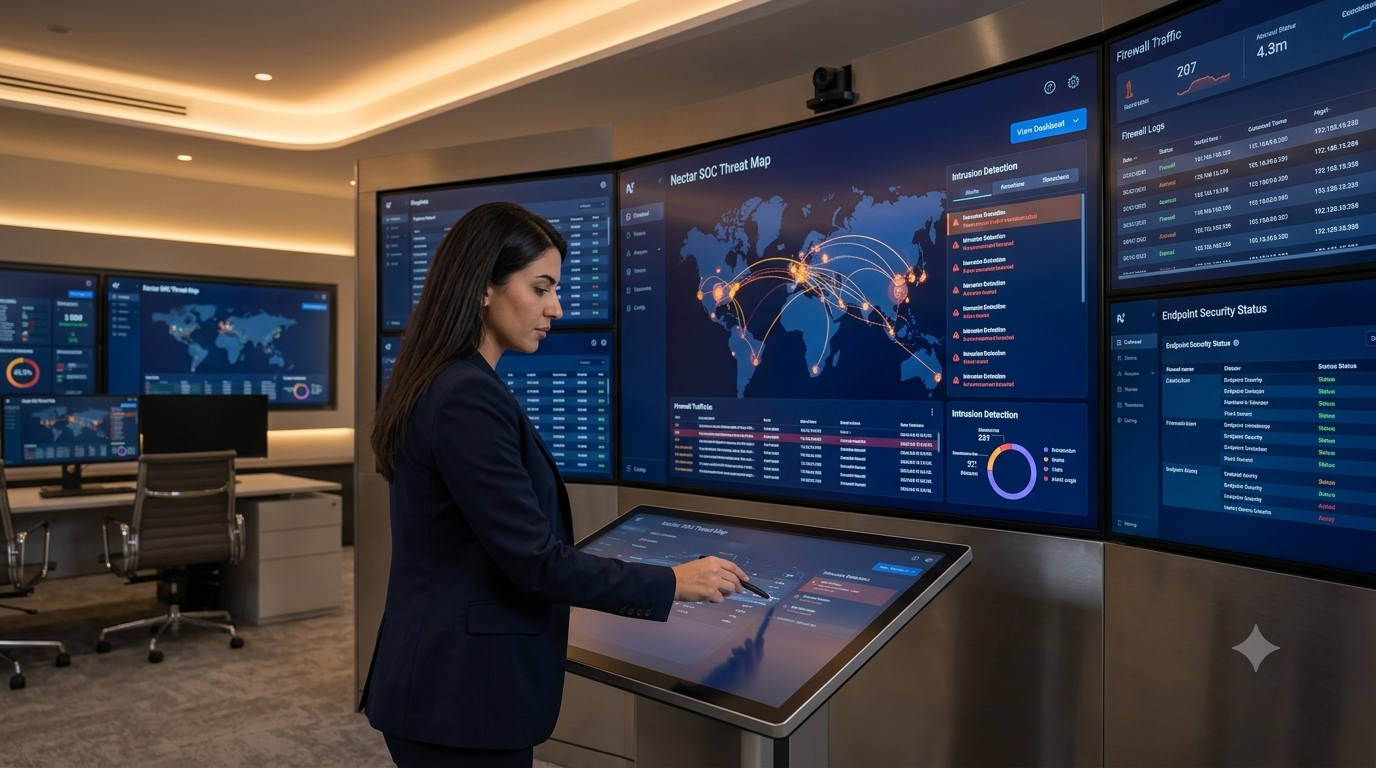
Threats don’t keep office hours. Continuous monitoring helps detect suspicious behavior such as unusual logins, unexpected data transfers or malware activity, so it can be investigated and contained quickly.
3. Patch and Vulnerability Management
Many security incidents exploit known weaknesses in software that simply hasn’t been updated. Managed providers keep operating systems, applications and firmware current through scheduled, tested patching, closing the doors attackers rely on.
4. Data Backup and Disaster Recovery
Ransomware, hardware failure, accidental deletion, fire or theft can all cause data loss. A reliable backup and disaster recovery plan ensures your critical information is copied regularly, stored securely and can be restored quickly. Just as important, a good provider tests those backups, because an untested backup is only a hope.
5. Access Control and User Management
Not everyone needs access to everything. Managed IT services enforce the principle of least privilege, giving each person only the access their role requires. They also make sure accounts are promptly removed when employees leave, closing a common security gap.
6. Security Awareness Training
People are often the weakest link in security. Phishing emails and social engineering rely on human error. Training your team to recognize suspicious messages dramatically reduces risk.
7. Compliance Support
Depending on your industry, you may need to meet data protection, privacy or security standards. Managed providers help document policies, maintain audit trails and implement the technical controls compliance requires, reducing risk and stress during audits.
How Managed IT Services Improve Technical Support
1. Faster Response and Resolution
A structured help desk means your employees know exactly where to go for help. Requests are logged, prioritized and tracked through to resolution. With SLAs in place, response times are defined and measured instead of left to chance.
2. Remote and On-Site Support
Many issues can be fixed remotely in minutes, with no waiting for a technician to arrive. When hardware or on-site work is needed, a good provider can dispatch support promptly.
3. Consistent, Documented Processes
ITSM brings consistency. Whether it’s onboarding a new employee or resolving a printer issue, steps are documented and repeatable, so quality doesn’t depend on which technician happens to answer.
4. Better User Experience
Employees who get quick, friendly, effective support are more productive and less frustrated. Customers also benefit indirectly, because internal efficiency leads to better external service.
5. Transparent Reporting
Regular reports show ticket volumes, response times, recurring issues and system health. This visibility helps leadership make informed decisions and verify the value of their IT investment.
ITSM and Managed IT Services: A Simple Comparison
| Area | Without Managed IT / ITSM | With Managed IT / ITSM |
|---|---|---|
| Approach | Reactive, fix-when-broken | Proactive, prevent-before-failure |
| Downtime | Frequent and unpredictable | Reduced through monitoring |
| Security | Basic, inconsistent | Layered, monitored, regularly updated |
| Costs | Unpredictable, emergency spending | Predictable monthly budget |
| Support | Ad hoc, slow, undocumented | Structured help desk with SLAs |
| Expertise | Limited to a few staff | Access to a broad specialist team |
| Planning | Short-term, reactive | Strategic roadmap aligned with goals |
Signs Your Business Needs Managed IT Services
If you recognize several of these, it may be time to consider a managed provider:
- Your systems slow down or crash regularly
- Employees waste time on recurring technical problems
- You don’t have a tested backup and recovery plan
- IT costs are hard to predict or keep rising
- You lack in-house cybersecurity expertise
- Software and devices are often out of date
- You’re growing and your IT can’t keep pace
- You’re unsure whether you meet compliance requirements
- Your internal IT person is overloaded or a single point of failure
- You’ve experienced (or narrowly avoided) a security incident
How to Choose the Right Managed IT Service Near You
Searching for a managed IT service near me is a smart first step. A local or regional provider often offers faster on-site response, familiarity with your market and a more personal relationship. But proximity alone isn’t enough. Here’s what to evaluate.
1. Local Presence and Responsiveness
A nearby provider can reach you quickly when hands-on help is needed, and understands local business conditions, regulations and infrastructure. Ask about on-site response times, not just remote support.
2. Range of Services
Look for a provider that covers the essentials: help desk, monitoring, security, backup, cloud, networking and consulting. A broad portfolio means you won’t need to juggle multiple vendors.
3. Clear SLAs
Ask for written commitments on response and resolution times, uptime targets and escalation procedures. Vague promises are a red flag.
4. Security Expertise
Ask how the provider protects client environments and their own systems. They should be able to explain their security stack, monitoring approach, incident response process and backup testing practices in plain language.
5. Industry Experience
Providers familiar with your industry understand its specific tools, risks and compliance requirements, and can work more effectively from day one.
6. Transparent Pricing
You should understand exactly what’s included, what’s extra and how pricing scales as you grow. Avoid agreements full of hidden fees or unclear exclusions.
7. Communication and Reporting
A great provider communicates clearly, explains issues without jargon, and provides regular reports and review meetings.
8. Scalability and Flexibility
Your business will change. Choose a partner who can adapt as you add users, locations or new technology.
9. Reputation and References
Look at client testimonials, case studies and reviews, and don’t hesitate to ask for references from businesses similar to yours.
Questions to Ask Before You Sign
- What exactly is included in your standard managed services package?
- What are your guaranteed response and resolution times?
- Do you offer 24/7 monitoring and support?
- How do you handle cybersecurity incidents?
- How often do you test backups and disaster recovery?
- How do you onboard new clients, and what does the transition look like?
- Who will be my point of contact, and how do escalations work?
- How do you report on performance and value?
- What happens if I want to end the agreement?
The Onboarding Process: What to Expect
Moving to managed IT services should be smooth and well-organized. A typical onboarding includes:
- Discovery and assessment: Reviewing your current systems, risks and pain points
- Documentation: Building an inventory of devices, software, licenses and configurations
- Planning: Agreeing on priorities, timelines and service levels
- Deployment of tools: Installing monitoring, security and management software
- Quick-win improvements: Addressing urgent risks, such as missing patches or backup gaps
- Ongoing management: Regular support, monitoring, maintenance and reporting
- Review and optimization: Periodic meetings to assess performance and plan improvements
Common Myths About Managed IT Services
Myth 1: “Managed IT is only for large companies.”
In reality, small and mid-sized businesses often benefit the most because they lack the resources for a full in-house team.
Myth 2: “It’s too expensive.”
When you account for downtime, emergency repairs, security incidents and staffing costs, managed services are often more cost-effective than reactive IT.
Myth 3: “I’ll lose control of my IT.”
A good provider works with you, providing visibility, reporting and strategic input. You stay in control of decisions.
Myth 4: “My internal IT person will become redundant.”
Many organizations use managed services to support their internal team, taking over routine tasks so staff can focus on higher-value projects.
Myth 5: “We’ve never had a problem, so we don’t need it.”
Good IT is often invisible. Having no problems may simply mean you’ve been lucky, and security threats are constantly evolving.
Industries That Benefit from IT Service Management
Almost every sector relies on technology, but some feel the impact especially strongly:
- Healthcare: Protecting sensitive patient data and keeping systems available
- Finance and accounting: Securing financial records and meeting regulatory demands
- Education: Managing devices, networks and online learning platforms
- Retail and e-commerce: Keeping point-of-sale and online stores running without interruption
- Manufacturing: Maintaining connected systems and operational technology
- Professional services: Safeguarding client data and supporting remote collaboration
- Real estate and hospitality: Supporting multiple locations and customer-facing systems
The Future of IT Service Management
ITSM and managed services continue to evolve. Several trends are shaping what businesses can expect:
- Automation and AI: Routine tasks like ticket routing, password resets and alert triage are increasingly automated, speeding up resolution.
- Cloud-first strategies: More businesses are moving applications and data to the cloud, increasing the need for expert management and security.
- Zero-trust security: Verifying every user and device, every time, is becoming the standard security model.
- Remote and hybrid work: Supporting employees anywhere requires secure access, strong endpoint management and flexible support.
- Data-driven decisions: Analytics and reporting help leaders understand IT performance and plan smarter investments.
Businesses that adopt a structured ITSM approach today are better prepared to take advantage of these shifts tomorrow.
Frequently Asked Questions (FAQ)
What is IT Service Management in simple terms?
IT Service Management is a structured way of planning, delivering, supporting and improving the IT services a business uses, so technology reliably supports business goals.
What is the difference between ITSM and managed IT services?
ITSM is the framework of processes and best practices for managing IT. Managed IT services are the outsourced delivery of those processes, including monitoring, support, security and maintenance, by a specialist provider.
How much do managed IT services cost?
Pricing varies based on the number of users and devices, the services included and the level of support. Most providers offer a predictable monthly fee. Request a customized quote based on your needs.
Are managed IT services suitable for small businesses?
Yes. Small businesses often gain the most, since they get enterprise-level expertise and security without the cost of building a large internal team.
How do I find a reliable managed IT service near me?
Search for providers in your area, review their services, SLAs, security practices and client feedback, and ask for a consultation. Prioritize responsiveness, transparency and proven experience.
Can managed IT services work alongside my internal IT team?
Absolutely. Many businesses use a co-managed model, where the provider supplements internal staff with extra tools, expertise and 24/7 coverage.
How do managed IT services improve cybersecurity?
They provide layered protection, continuous monitoring, regular patching, backup and recovery, access controls, employee training and compliance support, reducing both the likelihood and impact of attacks.
How quickly can a managed IT provider start?
Timelines vary, but after an initial assessment, most providers can begin monitoring and support within a few weeks, with improvements rolled out in stages.
Why Partner with Nectar Limited?
Choosing an IT partner is a decision about trust. You need a team that understands your business, communicates clearly and takes responsibility for keeping your technology secure and dependable. Nectar Limited is committed to helping businesses build reliable, secure and efficient IT environments through a service-focused approach.
Want to know who we are, what we stand for and how we work with our clients? Learn more about Nectar Limited and see how our team can support your business.
Conclusion
IT Service Management isn’t just a technical concept. It is a practical approach to making technology dependable, secure and aligned with your goals. By partnering with a managed IT provider, you gain proactive monitoring, stronger cybersecurity, faster support, predictable costs and expert guidance, all of which translate into better business performance.
If you’re tired of firefighting IT problems, worried about security or ready to scale with confidence, now is the time to act. Start by searching for a managed IT service near you, compare providers carefully and choose a partner who treats your success as their own.
Ready to improve your IT performance, security and support? Get in touch with Nectar Limited today and take the first step toward smarter, more reliable IT.
The Nectar team delivers practical insights on IT infrastructure, network security, physical security, and ZATCA ERP for businesses in Saudi Arabia.



Related Articles
Planning physical security with integrated CCTV, access control, and alarm systems.